
Introduction
General Policies brings together the approval rules for the instance's configuration and registration actions. They can be accessed through Governance > General Policies.
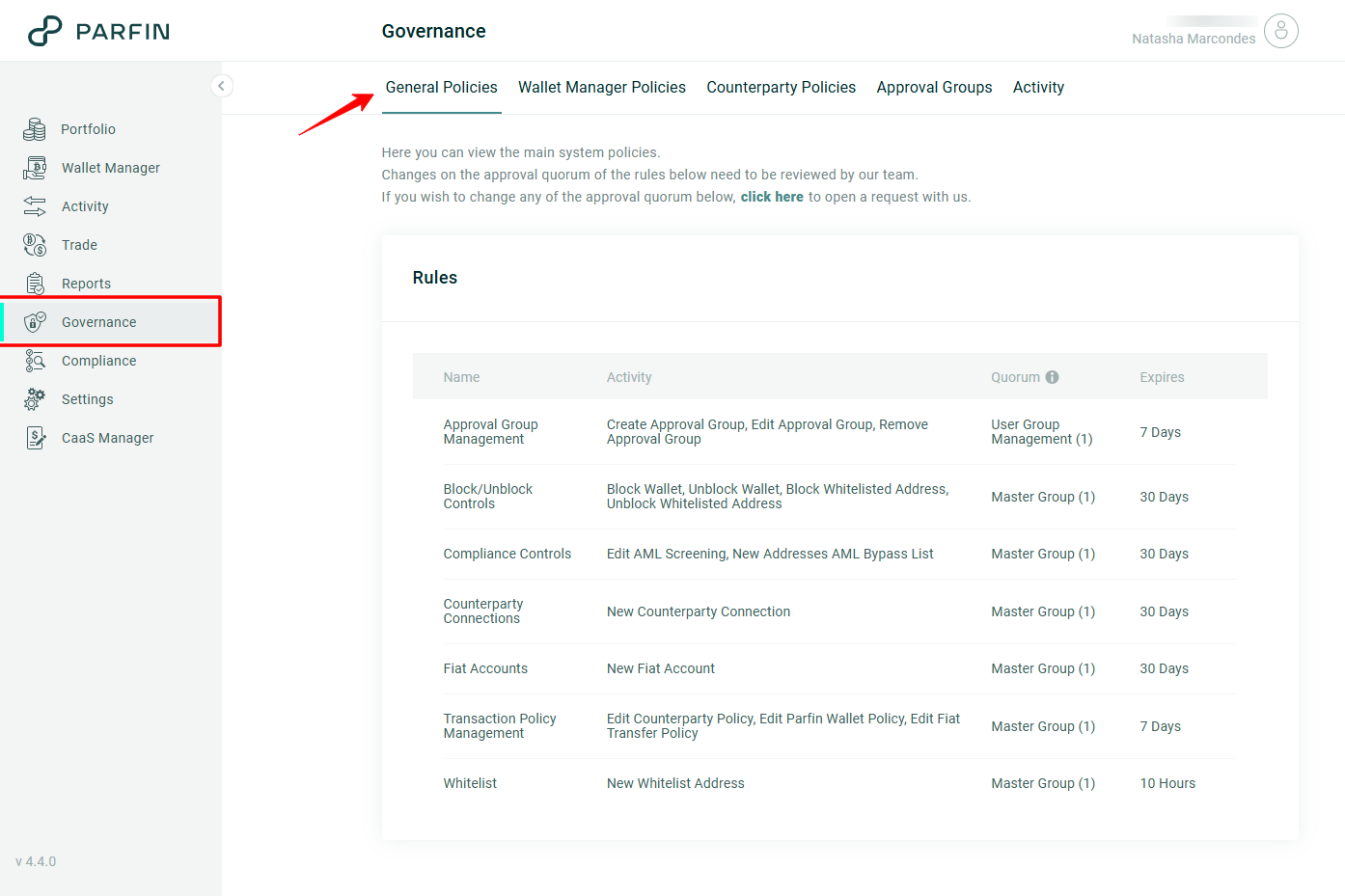
Each row of the table shows one approval rule, with the following details:
| Column | What it shows |
|---|---|
| Name | Shows the name of the rule. |
| Activity | Shows the activities governed by that rule. |
| Quorum | Shows the groups and the number of approvers required. |
| Expires | Shows the expiration deadline of the request. |
The quorum and the expiration deadline of each rule can be adjusted to the institution's needs. To change the quorum or the deadline of a rule, contact Parfin support (support@parfin.io).
To learn more about the concepts of rule, activity, approval group, quorum and request, as well as the life cycle of a request and the conditions to approve, see How governance works on the Parfin platform.
Operations that require an approval flow
The operations that require an approval flow to be configured are:
- Approval group management
- Block and unblock controls
- Compliance controls
- Registering counterparty connections (Counterparty Connections)
- Registering fiat accounts (Fiat Accounts)
- Transfer policy management (Transaction Policy Management)
- Registering whitelist addresses (Whitelist)
Approval group management
Governs the following activities:
- Creating an approval group (Create Approval Group)
- Changing the name or the members of a group (Edit Approval Group)
- Removing a group (Remove Approval Group)
Approval groups can be accessed through Governance > Approval Groups.
Block and unblock controls
Governs the following activities:
- Blocking a wallet (Block Wallet)
- Unblocking a wallet (Unblock Wallet)
- Blocking a whitelisted address (Block Whitelisted Address)
- Unblocking a whitelisted address (Unblock Whitelisted Address)
To know more about blocking and unblocking controls visit: Block and Unblock Wallets and Whitelisted Addresses
Compliance controls
Governs the following activities:
- Changing the AML Screening configuration (Edit AML Screening)
- Adding new addresses to the Bypass List (New Addresses AML Bypass List)
The AML settings can be accessed through Compliance > AML.
Counterparty connections
Governs the connection of a new counterparty (New Counterparty Connection), in Settings > Counterparties.
Fiat accounts
Governs the registration of a new fiat account (New Fiat Account), in Settings > Fiat Accounts.
Transfer policy management (Transaction Policy Management)
Governs the following activities:
- Changing the Wallet Manager policy list (Edit Wallet Manager Policies)
- Changing the counterparty policy list (Edit Counterparty Policy)
- Changing the fiat transfer policy list (Edit Fiat Transfer Policy)
These actions take place in the Wallet Manager Policies and Counterparty Policies tabs, under the Governance menu.
Registering whitelist addresses (Whitelist)
Governs the registration of a new whitelist address (New Whitelist Address), in Settings > Whitelist.
When a rule is not configured
Without the corresponding approval rule, the action becomes unavailable: fields and buttons are disabled and the Parfin platform displays the Approval Flow Not Configured notice, stating that the operation requires a governance rule.
In these cases, a request must be opened in the Parfin support portal so that the rule can be created.