
Introduction
AML is the module that allows each instance to configure and operate its own AML controls. With this module, an instance can connect its AML provider, define its risk assessment policy, configure notification recipients, maintain a Bypass List, and review AML assessment results.
AML applies to inbound and outbound transfers processed by the Wallet Manager.
Supported AML provider:
Elliptic
Chainalysis
How it works
Overview
The AML engine uses the instance’s current AML Screening configuration to perform risk assessments. This means screening behavior always depends on the combination of:
- AML Screening status;
- selected provider;
- configured risk profile;
- transfer direction;
- type of flow in which the transfer was identified;
- automatic actions supported by the Custody Provider involved.
When AML Screening is enabled, the Platform queries the selected provider, normalizes the response, and classifies the assessment as:
RISKY;RISKY_BYPASS;NOT_RISKY;NOT_SUPPORTED;ERROR;TIME_OUT;DISABLED.
The engine operates across two main flow types:
| Flow | When AML takes place | What is assessed | Possible consequence |
|---|---|---|---|
| Inbound | After an inbound transfer is identified and considered completed by the Custody Provider | The received transfer and the source of funds | The result is recorded, and automatic compliance actions may be executed according to the Custody Provider |
| Outbound | After Governance approval and before the transfer is sent to the Custody Provider | The destination address | The transfer may proceed, be interrupted, or be recorded with bypass |
The AML screening result and the automatic compliance action are different concepts.
For example, an inbound transfer may be classified as RISKY. Based on that result, the Platform will execute an automatic action, such as freezing the transfer or blocking a Wallet, depending on the provider, the configuration, and the available capabilities.
Inbound flow
In the inbound flow, AML is executed after the Platform identifies an inbound transfer completed by the Custody Provider.
When AML Screening is enabled, the Platform sends the transfer to the AML provider configured for the instance.
If the result is RISKY, the system:
- records the assessment result;
- sends the Risky Inbound Transaction email to the configured Notification Recipients;
- checks whether the source address is covered by the Bypass List;
- if there is an active bypass, records the result as
RISKY_BYPASSand does not execute automatic actions; - if there is no bypass, executes the configured automatic actions according to the Custody Provider’s capabilities.
Examples of possible automatic actions include:
- for a Fireblocks Wallet, the automatic action is to freeze the transfer — Freeze Transfer;
- for a Parfin Wallet, the automatic action is to block the Wallet — Block Wallet;
- when there is a link to a CaaS Manager end user, the end user is also blocked — Block End-user.
For all other results, other than RISKY, the AML result is recorded and no automatic compliance action is executed.
Inbound AML does not prevent the assets from being received. The assessment is performed on a transfer that has already been identified in the Custody Provider. Automatic actions determine the operational and compliance treatment after the risk is identified.
Outbound flow
In the outbound flow, AML is executed on outbound transfers initiated from the Platform, after Governance approval and before the transfer is sent to the Custody Provider.
When the destination address is classified as RISKY, the system:
- records the result;
- sends the Risky Destination Address email;
- checks whether the destination address is covered by the Bypass List;
- if there is an active bypass, records the result as
RISKY_BYPASSand the transfer may proceed; - if there is no bypass, the transfer is not sent to the Custody Provider.
When the destination is a Custody Provider integrated with Wallet Manager or a whitelisted address in the instance, additional actions may be executed.
Outbound transfers created directly in the Custody Provider and only synchronized by the Platform do not go through AML.
Exception cases
Not every assessment ends as RISKY, RISKY_BYPASS, or NOT_RISKY.
The AML provider may respond with a failure, or the Platform may not receive a conclusive response within the Provider Response Timeout configured for the instance. In these cases, the AML result is recorded as:
ERROR;TIME_OUT.
Some AML providers do not return the assessment in the same call. When the provider indicates that the analysis is still in progress, the Platform waits for the definitive response instead of closing the assessment, and only then completes the handling of the transfer. The Provider Response Timeout is the limit of that wait.
The operational treatment depends on the transfer direction:
| Flow | Treatment |
| Inbound | The deposit has already been identified in the Custody Provider. The Platform records the AML failure and does not automatically execute risk-based blocking or freezing actions. |
| Outbound | The transfer does not proceed to execution. The result is recorded, and the operation is interrupted without being propagated to the Custody Provider. |
The difference between ERROR and TIME_OUT is the source of the failure:
- with
ERROR, the provider responded, the response itself reported a failure; - with
TIME_OUT, the Platform stopped waiting: the Provider Response Timeout expired and no conclusive response arrived.
Both results mean the same thing in operational terms: there was no conclusive AML classification. The Platform applies to TIME_OUT exactly the same handling it applies to ERROR, in both directions, and takes no automatic blocking or risk-notification action in either case. The event is recorded in the AML Screening Report for manual review.
Treatment by AML result
When the AML engine returns a result, the Platform checks whether any operational consequence must be applied.
These consequences may include:
- only recording the result;
- sending notifications;
- interrupting the transfer; or
- executing automatic compliance actions, such as blocking a Wallet, freezing a transfer, or blocking an end user.
Automatic actions depend on:
- transfer direction;
- AML result;
- Custody Provider involved;
- existence of an active bypass;
- existence of a link to a CaaS Manager end user;
- actions supported by the Custody Provider integration.
The table below summarizes the expected behavior:
| Flow | AML assessment result | Custody Provider | What happens to the transfer |
| Inbound | DISABLED, NOT_SUPPORTED, NOT_RISKY, ERROR, or TIME_OUT | Any provider | The deposit is processed normally by the Platform. The AML result is recorded. No automatic action is executed. |
| Inbound | RISKY_BYPASS | Any provider | The deposit is processed normally by the Platform. The Risky Inbound Transaction email is sent. Automatic actions to block, freeze, or block an end user are not executed. |
| Inbound | RISKY | Parfin | The deposit is processed normally by the Platform. The Risky Inbound Transaction email is sent. The deposit Wallet is blocked. If the Wallet is associated with a CaaS Manager end user, the end user is also blocked. |
| Inbound | RISKY | Fireblocks | The deposit is processed normally by the Platform. The Risky Inbound Transaction email is sent. The transfer is frozen in the Custody Provider. If the Wallet is associated with a CaaS Manager end user, the end user is also blocked. |
| Outbound | DISABLED, NOT_SUPPORTED, or NOT_RISKY | Any provider | The transfer proceeds to the Custody Provider. No automatic compliance action is executed. |
| Outbound | RISKY_BYPASS | Any provider | The Risky Destination Address email is sent. The transfer proceeds to the Custody Provider because the destination is covered by an active bypass. |
| Outbound | RISKY | Any provider | The Risky Destination Address email is sent. The transfer is rejected and is not sent to the Custody Provider. When applicable, the destination address is blocked, such as for Parfin Wallet destinations or Whitelisted Addresses. |
| Outbound | ERROR or TIME_OUT | Any provider | The transfer is rejected and is not sent to the Custody Provider. |
RISKY_BYPASS does not mean absence of risk. It means the screening identified risk, but there is an active bypass that prevents the automatic actions expected for that flow.
Functional structure of the AML module
The AML module is located under the Compliance menu and is composed of five main elements:
Provider Connection
AML Screening Settings
Bypass List
Notification Recipients
AML result visibility
Provider Connection
The Providers tab contains the AML provider accounts connected to the instance. Multiple accounts can be connected at the same time, but only one can be used for AML evaluations.
Connecting a provider does not activate AML automatically. A provider connection only makes that provider available for selection in AML Screening. For AML to start monitoring the instance, there must be an active configuration with:
a selected provider
a valid risk profile
When removing a connected provider account, the following restrictions apply:
the connection cannot be in use by AML Screening
the connection cannot be associated with a pending AML Screening change request
AML Screening Settings
AML Screening defines how the instance applies risk assessment across its AML flows. In this section, the instance selects the provider, defines the risk profile, and enables or disables monitoring.
- When AML Screening is active, the system uses the instance’s current configuration to perform risk assessments.
- When AML Screening is inactive, the system does not perform AML risk assessments for that instance.
Risk Profile
The risk profile is the rule the AML engine uses to determine whether a given evaluation should be considered risky.
Each AML provider has its own risk assessment parameters, so the definition of the risk profile depends on the selected provider.
- Elliptic
- Elliptic uses a score from 0 to 10.
- In this case, the risk profile configured in the AML engine represents the threshold from which an evaluation should be considered risky.
- Transfers and addresses with a risk score equal to or greater than the value configured in AML Screening are classified as Risky. Values below that threshold are classified as Not Risky.
- Chainalysis
- Chainalysis does not use a numeric score, but rather alerts by severity.
- The risk profile is defined through a cumulative selector for the minimum alert level that makes an evaluation risky:
- Severe — only severe alerts;
- High — severe and high alerts;
- Medium — severe, high, and medium alerts;
- Low — any alert.
- The evaluation considers only direct exposure (direct) alerts; indirect exposures are disregarded. When there are multiple alerts, the most severe one prevails.
Switching the selected provider (Elliptic ↔ Chainalysis) discards the previous risk profile, since each provider has its own assessment model.
Provider Response Timeout
The Provider Response Timeout defines, in seconds, the maximum time the Platform waits for a conclusive response from the AML provider. When that time expires without a conclusive response, the assessment is recorded as TIME_OUT.
The setting is global to the instance and independent of the selected provider: the same value applies to every AML provider connected to the instance, so switching providers does not require recalibrating the wait.
The value is a trade-off you control. A shorter wait returns faster but increases the chance of an inconclusive assessment, a TIME_OUT, handled the same way as an ERROR. A longer wait increases the chance of a conclusive result, at the cost of taking longer to complete the operation. Set it according to your instance’s operational profile.
Field rules:
Accepts positive integers only, starting at 1.
The unit is seconds.
It is required: AML Screening cannot be saved with the field empty.
You can change this field on its own, leaving the other AML Screening settings untouched, as long as they are already filled in.
All changes made in the AML Screening section go through an approval flow defined by the Compliance Controls governance rule, available in Governance > General Policies, before they take effect. This includes:
enabling or disabling AML Screening
selecting or changing the AML provider
defining or changing the risk profile
defining or changing the Provider Response Timeout
Bypass List
The Bypass List defines controlled exceptions for addresses that, even when classified as risky by the AML provider, should not trigger the automatic actions normally expected for that flow, such as wallet blocking or user blocking.
The bypass does not remove screening. It only changes the consequence applied when the AML result is Risky.
The list can be used in two contexts:
Inbound flows: to register source addresses for deposits
Outbound flows: to register destination addresses for outgoing transfers
Each Bypass List entry contains:
Address – the address itself
Network – the blockchain/network
Direction – defines in which flows the address should be considered:
Origin – treats the registered address as a deposit source address
Destination – treats the registered address as a withdrawal destination address
Both – treats the registered address as both source and destination
Reason – free-text field used to document the rationale and approval context
Expiration Date – the date after which the bypass automatically stops taking effect
Any new address added to the Bypass List must go through the approval flow defined by the Compliance Controls governance rule in Governance > General Policies.
Notification Recipients
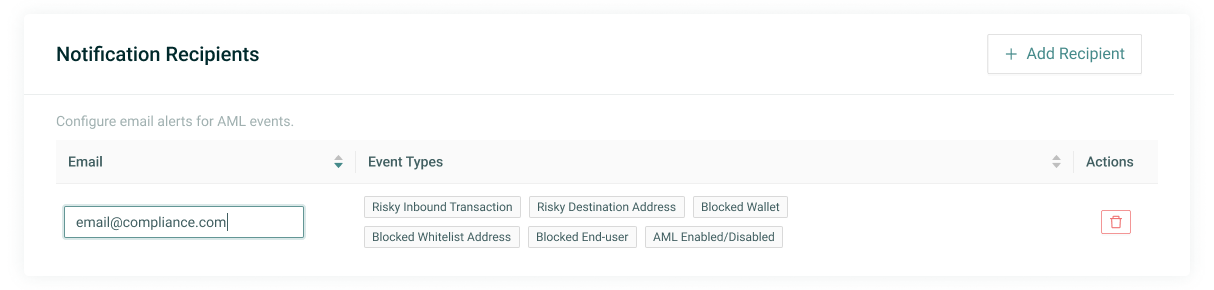
The Notification Recipients section allows the instance to define which email addresses should receive AML-related alerts.
If no recipients are configured, the actions still take place in the system, but no email notifications are sent.
At the moment, the instance manages the list of recipients, but the event types are fixed. Configured recipients are notified whenever:
- an identified deposit is classified as risky — Risky Inbound Transaction;
- a destination address in an outbound transfer is classified as risky — Risky Destination Address;
- a wallet is blocked — Blocked Wallet;
- a whitelisted address is blocked — Blocked Whitelisted Address;
- an end user associated with CaaS Manager is blocked — Blocked End-user;
- AML Screening is enabled or disabled — AML Enabled/Disabled;
- a transfer is frozen in the Custody Provider — Transfer has been frozen.
Managing Notification Recipients does not require an approval flow. Changes are applied immediately after saving.
Configuration changes and approval flows
Some AML module changes must go through governance before they take effect. While a change request is still pending approval, the current configuration remains in force.
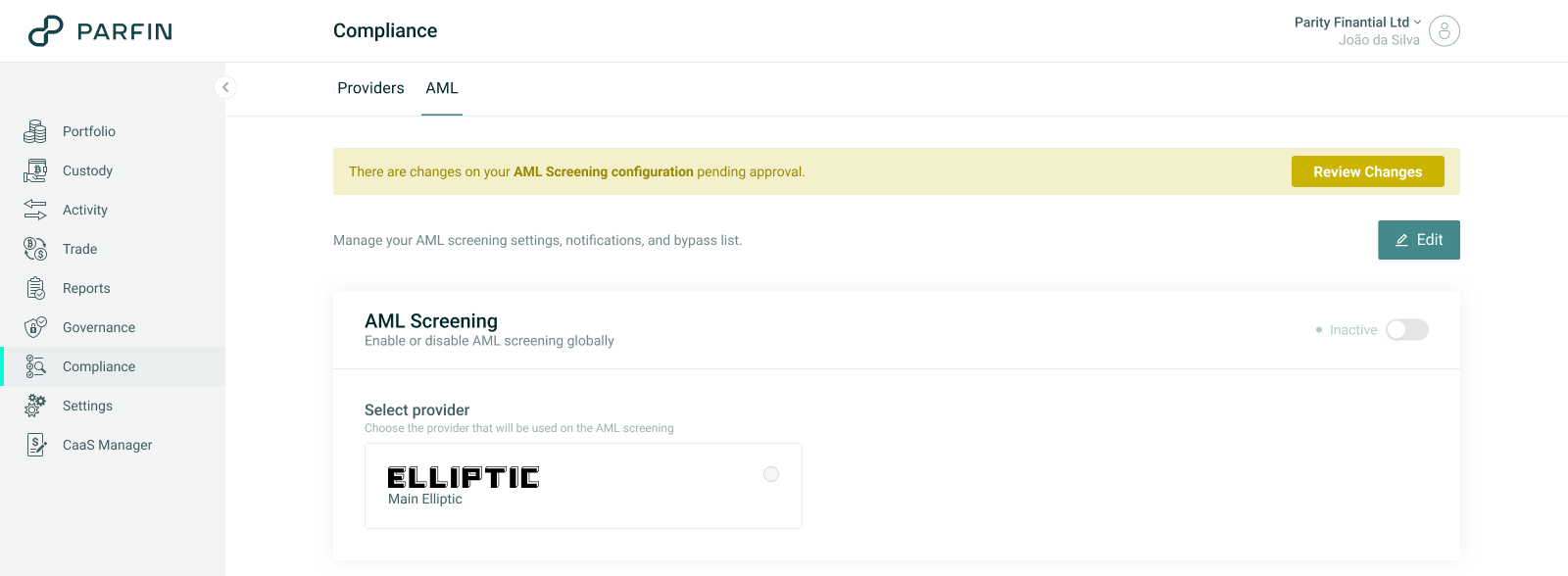
The applicable approval flow is defined by the Compliance Controls governance rule in Governance > General Policies. Whenever there is a pending change request, the AML page continues to display the current active configuration and shows a pending approval banner with a Review Changes action.
Below is a summary of which actions require governance and when they are applied:
| Action | Requires Approval Flow | Application |
|---|---|---|
| Add a new AML provider | No | Immediate |
| Select or change the AML provider in AML Screening | Yes | After approval |
| Change the risk profile in AML Screening | Yes | After approval |
| Change the Provider Response Timeout in AML Screening | Yes | After approval |
| Enable or disable AML Screening | Yes | After approval |
| Add an address to the Bypass List | Yes | After approval |
| Remove an address from the Bypass List | No | Immediate |
| Add or remove a Notification Recipient | No | Immediate |
Additional provider-specific considerations
Elliptic
Although Elliptic returns a risk score for evaluations performed on its platform, in some cases it may return other responses that may look like errors at first glance, but are not treated that way by the Platform.
Below is how the Platform AML engine maps and interprets those scenarios:
Null or 404 Error – usually indicates the address has no history in the provider’s database.
Platform mapping:NOT_RISKY.400, 401, 403, 500, or any other unexpected Elliptic error
Platform mapping:ERROR.
Chainalysis
Chainalysis responds with alerts by severity and exposure. The Platform AML engine maps each scenario as follows:
- The provider responded with an error:
ERROR. - The Platform received no conclusive response from the provider within the Provider Response Timeout configured for the instance:
TIME_OUT. - No alerts, or only indirect-exposure alerts:
NOT_RISKY. - There is a direct-exposure alert with severity equal to or greater than the configured level:
RISKY(which may becomeRISKY_BYPASSif covered by the Bypass List).
Step by step
1. Access AML Self-Service
In the instance menu, click Compliance.
The page opens with the Providers and AML tabs.
Use the Providers tab to manage AML provider connections.
Use the AML tab to configure screening, bypass, and notifications.
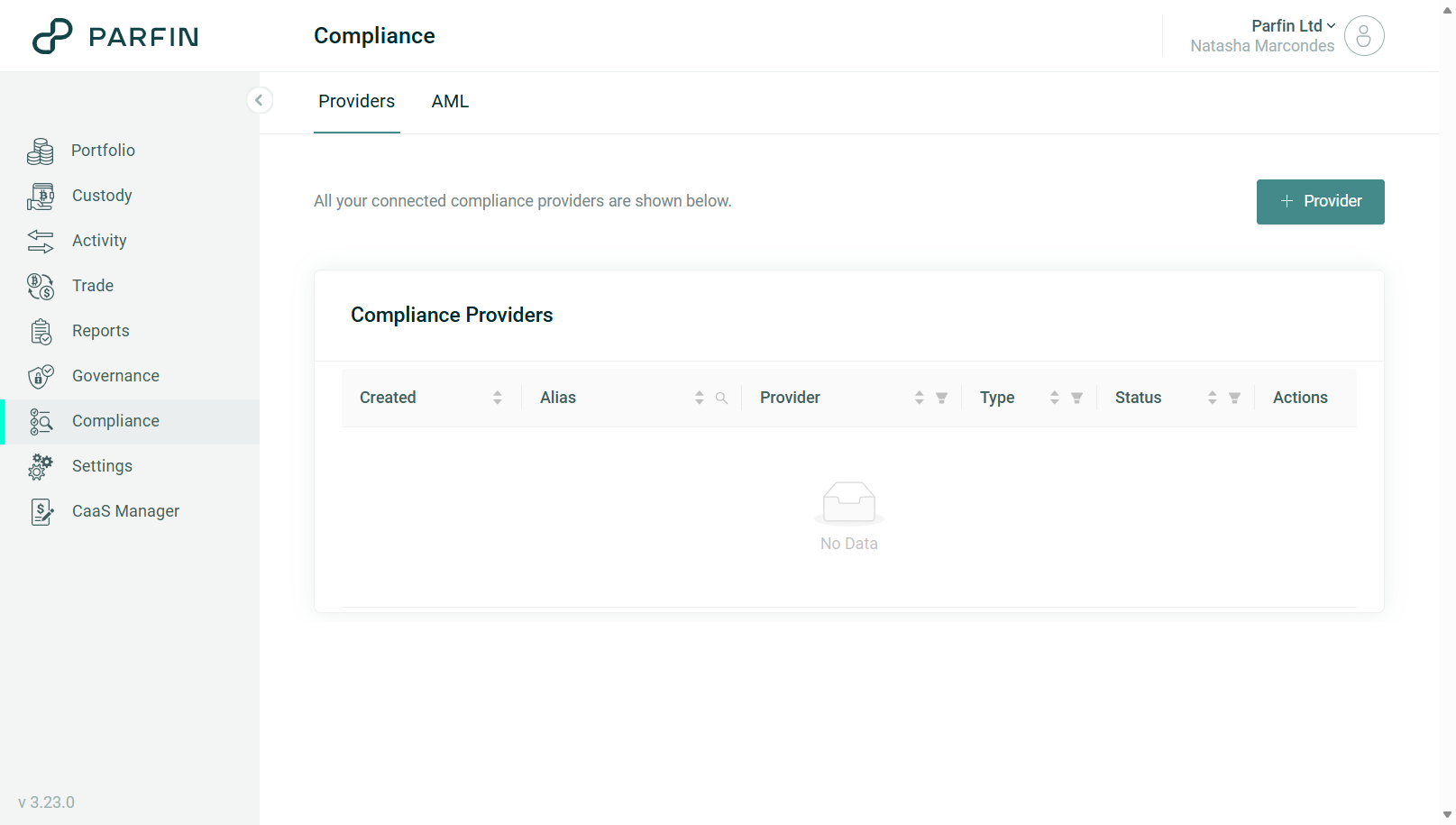
2. Connect an AML provider
Go to Compliance → Providers.
Click + Provider.
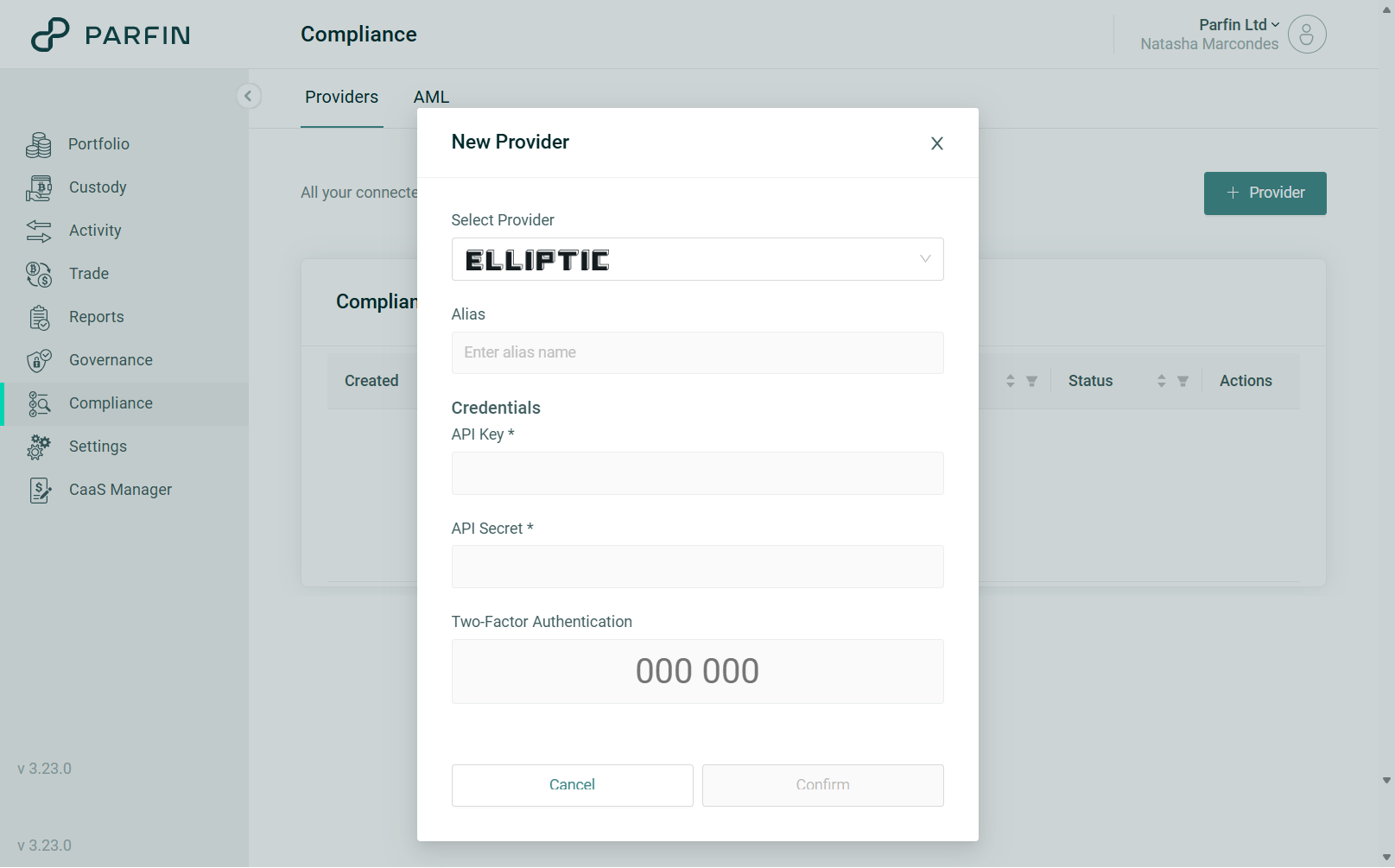
Fill in the following fields:
Provider
Alias
Credentials (for Elliptic: API Key and API Secret; for Chainalysis: API Token)
2FA
Confirm the action.
The system validates the credentials.
Once created successfully, the connection becomes available for selection in AML Screening.
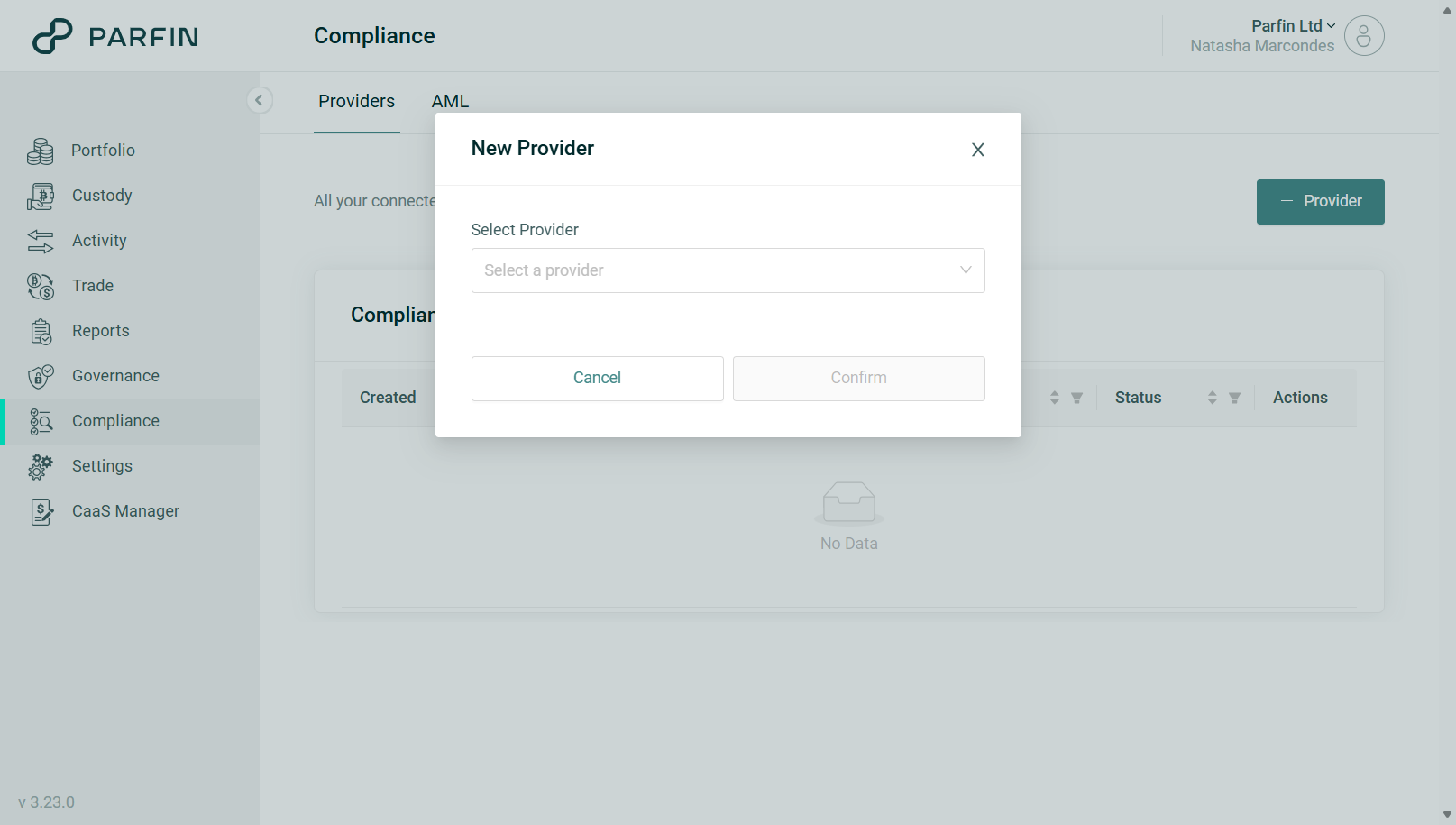
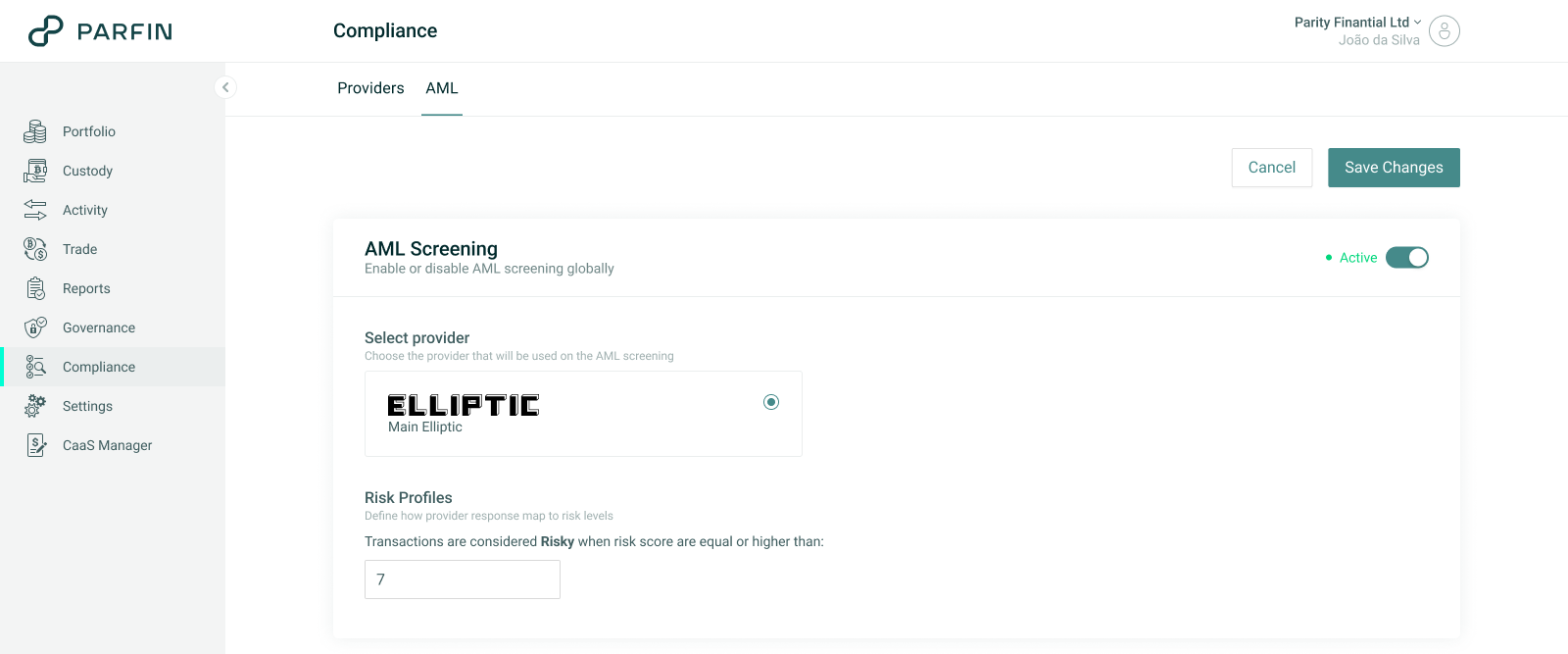
3. Configure AML Screening
Go to Compliance → AML.
Click Edit.
Select a connected provider.
Define the Risk Profile.
Set the Provider Response Timeout, in seconds.
Adjust the AML Screening status according to the instance policy.
Click Save Changes and confirm with 2FA.
The change request is then created and remains pending approval.
Changes only take effect after the request is approved through the governance flow.
If the request is rejected, canceled, or expires, the previous active configuration remains in effect.
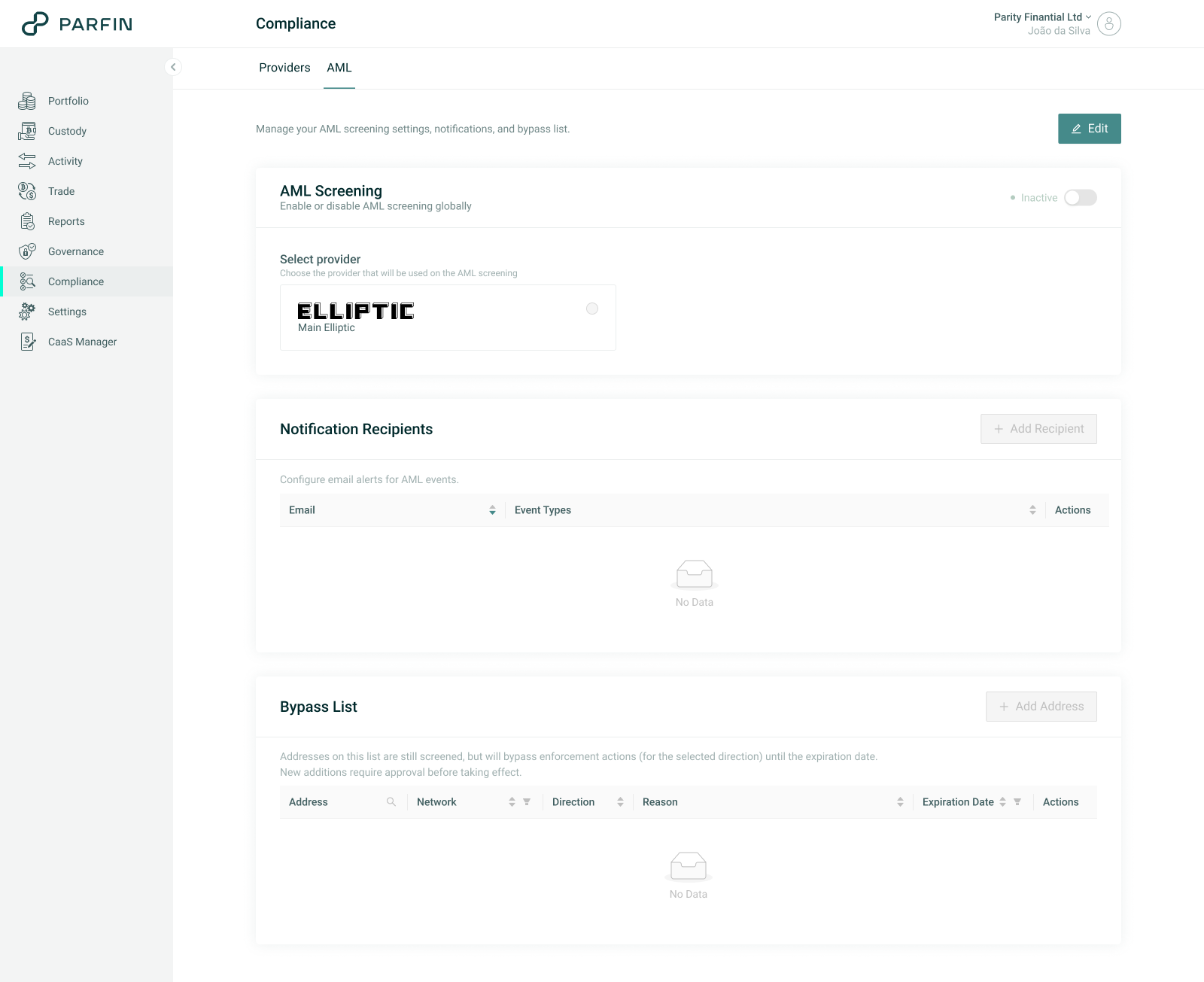
Whenever a change request is pending approval, a banner is displayed at the top of the page.
4. Manage the Bypass List
Go to Compliance → AML.
Click Edit.
Go to the Bypass List section.
To add a new entry:
Click + Add Address.
Provide:
Address
Network
Direction
Reason (optional)
Expiration Date
To remove an existing address:
Click the trash icon.
Confirm the deletion.
Then:
Save the changes.
Confirm with 2FA.
New addresses follow the instance’s governance flow and only take effect after approval.
Address removals are applied immediately after confirmation.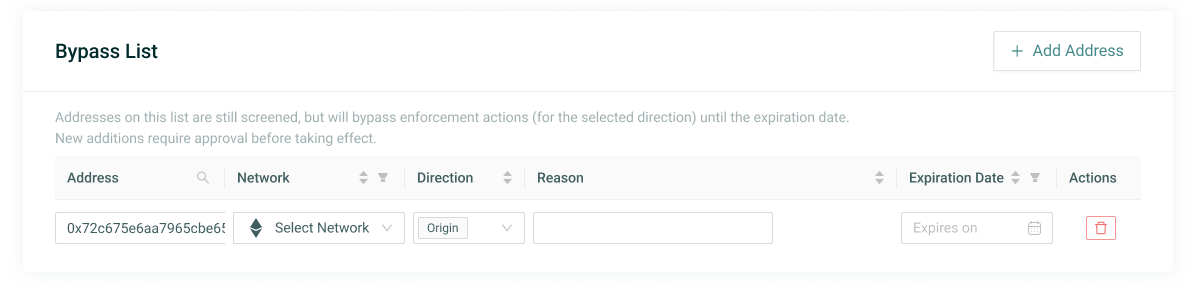
Whenever a Bypass List change request is pending approval, a banner is displayed at the top of the page.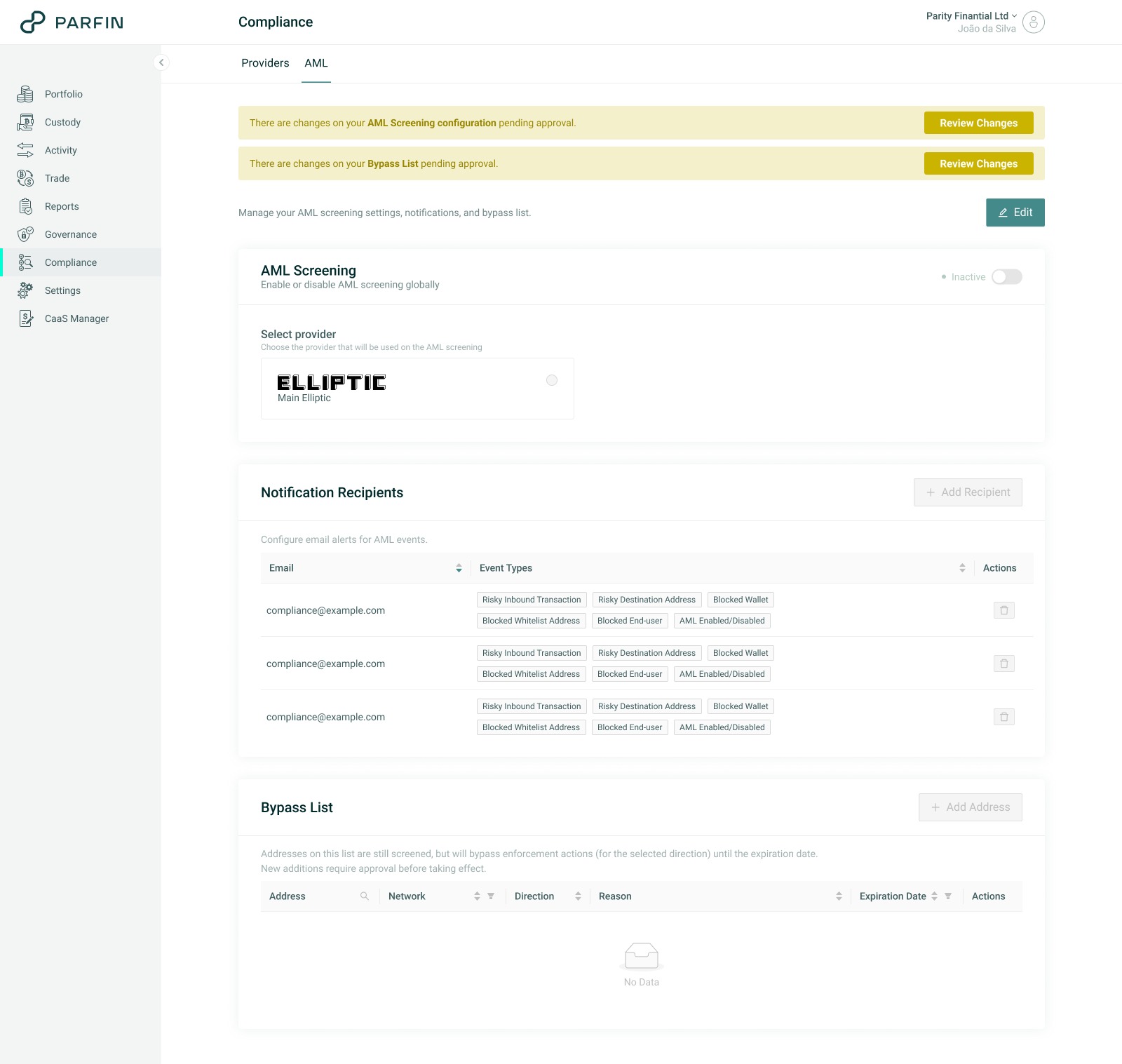
5. Configure Notification Recipients
Go to Compliance → AML.
Click Edit.
Go to the Notification Recipients section.
To add new recipients:
Click + Add Recipient.
Enter a valid email address.
To remove existing recipients:
Click the trash icon.
Confirm the deletion.
Then:
Save the changes.
Confirm with 2FA.
The configured recipients will begin receiving AML alerts for that instance.
Visibility and reports
AML Screening Report
The AML Screening Report can be exported by the instance and provides the results of the screenings performed, including the AML module result and the provider response for applicable cases.
The report is available under Reports > AML Screening and includes the following information:
ID – unique identifier of the evaluation in the Platform
Created At – UTC date and time when the evaluation was created
Provider – provider used in the evaluation (for example, Elliptic)
Provider Response ID – identifier returned by the provider, useful for checking details in the provider’s own platform. On a
TIME_OUT, it is filled in with the provider identifier whenever one was already obtained when the assessment request was first registered with the provider.Screening Type –
Automaticfor evaluations triggered by the AML engine on inbound and outbound transactionsAML Check – consolidated evaluation result:
NOT_SUPPORTED– the asset or blockchain is not covered by the selected providerNOT_RISKY– the result is considered not riskyRISKY– the result is considered riskyRISKY_BYPASS– the result is considered risky, but the address involved is currently covered by an active bypass. No block or cancellation actions are appliedERROR– screening failed due to provider or internal Platform errorTIME_OUT – no conclusive response from the provider within the Provider Response Timeout configured for the instance. No block or cancellation actions are applied
Screen Subject – indicates what was sent to the provider for the risk evaluation:
Addressand/orTransaction HashAddress – address sent to the AML provider when the subject is
AddressTransaction Hash – transaction hash sent to the AML provider when the subject is
Transaction HashParfin Transaction ID – identifier of the transaction in the Platform when the evaluation is associated with an instance transaction
Provider Response – raw provider response, useful for deeper analysis, audit, and reconciliation. On a
TIME_OUT, it carries the last snapshot the AML engine obtained from the provider. On anERROR, it carries what the provider returned in the error.
Transaction Details (AML Check)
The AML Screening result associated with a transfer can also be consulted through the API and through webhooks.
Transaction details expose the AML Check field, which contains the evaluation result. Possible values include:
- DISABLED
- NOT_SUPPORTED
- RISKY
- RISKY_BYPASS
- NOT_RISKY
- ERROR
- TIME_OUT
Endpoints that include AML Check information
- Parfin wallets: https://api.parfin.io/v1/api/transaction/{transactionId}
- Monitored external wallets: https://api.parfin.io/v1/api/transaction/external
CaaS Manager End user Funding
When deposit wallets are associated with CaaS Manager endusers, the AML evaluation result for a given deposit made into those wallets can be reviewed. In CaaS Manager > Funding, the AML result is displayed in the AML Result column (in the Pending and Completed tabs and in the Transaction Details modal).
The possible values are displayed as:
- Disabled;
- Not supported;
- Not risky;
- Risky;
- Risky bypassed;
- Error;
- Timed out;
- "-" when not applicable.
Frequently Asked Questions (FAQ)
What is the AML Module?
It is the Parfin Platform module that allows each instance to configure and operate its own AML setup, including provider connection, screening rules, bypass configuration, notification recipients, and AML result visibility.
Which AML provider is supported?
The supported providers are Elliptic and Chainalysis.
Does connecting a provider automatically enable AML?
No. Connecting a provider does not change the engine behavior on its own. The provider must be selected, the risk profile must be configured and approved, and AML Screening must be active.
What happens when AML Screening is disabled?
The engine stops running AML evaluations. Transactions continue through the normal execution flow without AML checks and are recorded with AML Check = DISABLED. The provider and risk profile settings remain saved, so when AML is re-enabled, the configuration returns to the same setup that existed before it was disabled.
How long does the Platform wait for the AML provider to respond?
For as long as the Provider Response Timeout configured for your instance, in Compliance > AML. It is a global instance setting and applies to every connected provider. When the time expires without a conclusive response, the assessment is recorded as TIME_OUT.
What is the difference between ERROR and TIME_OUT?
ERROR means the provider responded and the response reported a failure. TIME_OUT means the Platform stopped waiting, because the Provider Response Timeout expired without a conclusive response. Operationally they are treated the same way: no automatic blocking action, no AML alert email, and the event recorded in the AML Screening Report for manual review. On an inbound transfer the deposit is credited normally; on an outbound transfer the transfer is rejected and is not sent to the Custody Provider.
Does changing the Provider Response Timeout require approval?
Yes. It is part of AML Screening, so the change goes through the Compliance Controls governance rule with 2FA and quorum. The new value applies only after final approval, and transfers already in progress keep the value that was in force when they started.
Can an instance operate without Notification Recipients?
Yes. In that case, no AML alert emails are sent.
Can I choose which notification types I want to receive?
No. Recipients are configurable, but the event types sent are fixed.
What happens if an address is in the Bypass List?
Screening still runs. If the result is Risky, the bypass prevents the automatic consequence that would normally apply to that flow, according to the configured direction.
Does adding an address to the Bypass List require approval?
Yes. Adding an address goes through governance. Removing an address is applied immediately and does not require governance.
Where can I see the AML result for a transaction?
You can review it in transaction details through the API, in transaction webhooks/events, and in the AML Screening Report.
Does AML work the same way for all Custody Providers?
No.
Screening follows the instance configuration, but automatic actions depend on each Custody Provider’s capabilities.
For example:
- Fireblocks allows a transfer to be frozen;
- Parfin Custody allows a Wallet to be blocked.
Where can the AML result of a transaction be consulted?
The result can be consulted in transaction details, through APIs, in transaction webhooks/events, and in the AML Screening Report.
When the operation is associated with CaaS Manager, the result can also appear in the Funding flow, when applicable.