
Introduction
The Wallet Manager makes it possible to create Wallets across different custody providers through a single flow on the Parfin Platform.
Although the creation experience is standardized, the options shown can vary. Each provider has its own organization model, its own supported networks, and its own rules for creating Vaults and Wallets.
This article explains:
- what is required before starting;
- how to fill in the creation form;
- why the fields vary between providers;
- what happens after the request is submitted;
- when the new Wallet will be available for use.
Before you start
The Add Wallet action is available only to instance administrators.
Parfin custody is enabled by default on the Platform and doesn't need to be connected beforehand. It is offered as an option whenever it supports the selected network.
To use other custody providers, such as Fireblocks, they must have been previously connected to the instance and be active.
The options available in the form depend on:
- the selected network;
- the providers enabled or connected to the instance;
- the features offered by each provider;
- the capabilities implemented in the integration with Parfin.
Important: the availability of a provider on the instance doesn't mean it supports every network or every Wallet type.
Each request creates a Wallet associated with a single network. To create Wallets on different networks, a separate request must be made for each network.
The creation of Wallets and Vaults doesn't go through an approval flow within the Parfin Platform.
Where to start the creation
The creation is started by selecting Add Wallet on one of the screens where this action is available, such as:
- Wallet Manager > Assets;
- Detailed view by asset;
- Wallet Manager > Wallets;
- Vault Details.
Regardless of the entry point, the Platform uses the same creation flow.
When the action is started from Vault Details, the Vault being viewed may already be considered as the destination, as long as it is compatible with the provider and with the creation of the new Wallet.
How the creation form is defined
The creation form is dynamic.
The fields and options shown change according to the network, the selected provider, and the features available in that context.
For example, the Platform may:
- allow choosing the Wallet type;
- request or automatically generate the Wallet name;
- allow selecting an existing Vault;
- allow creating a new Vault;
- automatically create a Wrapper Vault;
- hide options that aren't compatible with the network or the provider.
Step by step
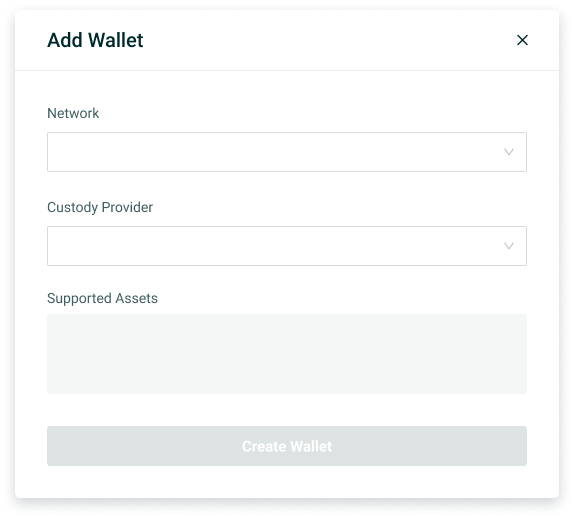
1. Select the Network
In the Network field, the blockchain on which the Wallet will be created must be selected.
The selected network determines:
- which providers can be used;
- which Wallet types will be available;
- which assets are supported;
- which fields will be shown in the rest of the form.
When the network is changed, the other options may be updated automatically.
2. Select the Custody Provider
In the Custody Provider field, the provider on which the Wallet will actually be created must be selected.
The list may include:
- Parfin, enabled by default on the instance;
- accounts of other connected and active providers that support the selected network.
The choice of provider determines:
- where the keys and the Wallet will be managed;
- how Vaults and Wallets will be organized;
- which Wallet types can be created;
- which information will need to be filled in;
- which features will be available after creation.
3. Review the Supported Assets
The Supported Assets block shows the assets that the provider offers for the selected network.
This information helps confirm whether the chosen context is compatible with the assets the organization intends to use.
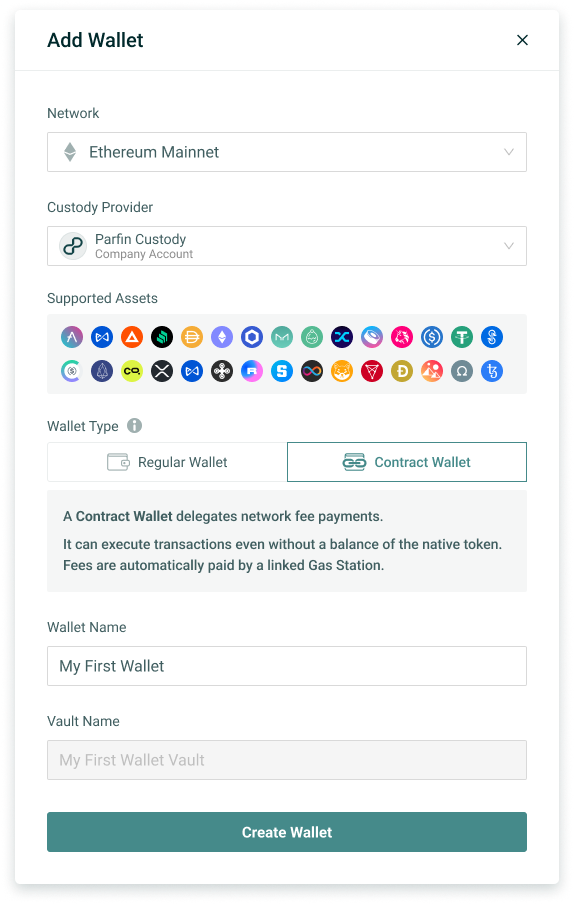
4. Choose the Wallet Type
When more than one type is available for the selected network and provider combination, the form shows the Wallet Type field.
To learn more about the existing Wallet types, see the Vaults, Wallets, and Deposit Addresses article.
5. Enter the Wallet Name
The Wallet Name field must be filled in, when available.
The name is used to identify the Wallet on the Platform and, when supported, on the provider itself.
Depending on the provider's model:
- the name may be entered by the user;
- the name may be generated automatically;
- the field may appear disabled;
- the Wallet may inherit a naming convention based on the Vault.
The specific naming rules should be checked in the documentation of the provider used.
6. Define the Vault
How the Vault is defined depends on the provider's model.
6.1 When the provider has a native Vault
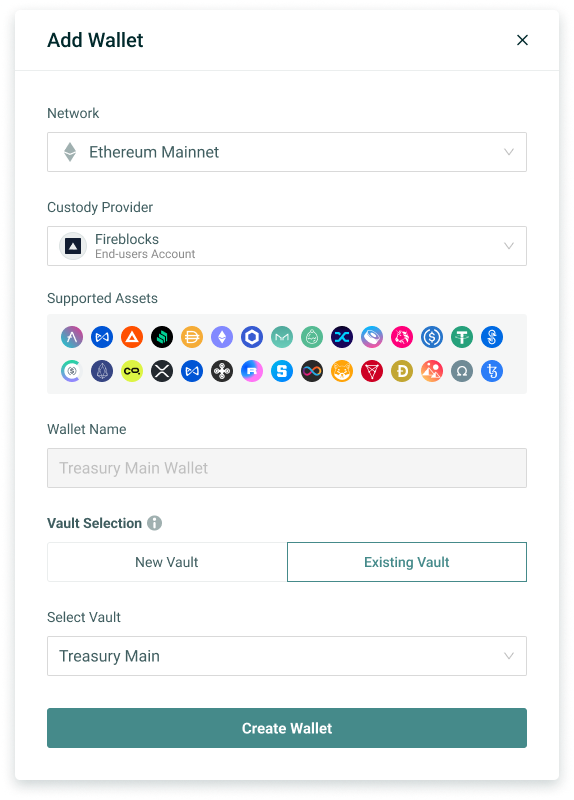
If the provider has its own structure equivalent to a Vault, the Platform may allow choosing between:
- creating the Wallet in a new Vault (New Vault);
- adding the Wallet to an existing Vault (Existing Vault).
New Vault
- Select New Vault and enter the Vault Name.
- The Platform will request that the provider create the new Vault and the Wallet associated with it.
Existing Vault
- Select Existing Vault and choose one of the options shown.
- The list will display the Vaults that already exist on the selected provider.
- The new Wallet will be created inside the chosen Vault.
6.2 When the provider doesn't have a native Vault
If the provider doesn't have a structure equivalent to a Vault, there is no need to select or create a Vault manually.
In this case, the Wallet Manager:
requests that the provider create the Wallet;
automatically creates a Wrapper Vault to represent it within the Platform's standardized model;
links the Wrapper Vault to the Wallet in a 1:1 relationship
- The resulting structure is: 1 Wrapper Vault → 1 Wallet
The Wrapper Vault name is generated automatically from the Wallet name.
The Wrapper Vault exists only in the Wallet Manager and doesn't represent the creation of a real Vault on the provider.
7. Finalize the Wallet creation
Once the required fields are filled in, select Create Wallet and enter the 2FA.
Some specific rules can only be evaluated by the provider after the request is submitted.
Example of creating a wallet on Parfin custody:
Example of creating a wallet on Fireblocks:
What happens after selecting Create Wallet
The creation isn't necessarily completed at the moment the request is submitted.
The Wallet Manager tracks the processing until the Wallet:
- is created on the provider;
- is synchronized with the Platform;
- is available for use.
The feedback shown depends on the provider's response:
Creation completed — When the provider confirms the creation during the flow itself, the Platform shows the success message with the new wallet's details.
Creation in progress — Some providers need more time to complete the creation or to make all of the Wallet's information available.
- In this case, the Platform shows a message indicating that the wallet is being created.
- The Platform tracks the request and updates the information automatically once the creation is completed.
- While it is being processed, the Wallet isn't shown in the lists; it appears only after its creation is confirmed.
Provider-specific characteristics
This article describes the general behavior of the Add Wallet flow.
Providers may have specific rules for:
- the organization of Vaults and Wallets;
- supported networks;
- available Wallet Types;
- creation in a new or existing Vault;
- name definition and generation;
- address availability;
- supported assets;
- actions available after creation;
- required restrictions and permissions.
Learn more
To explore other related concepts, see: