
Summary
- Introduction
- How to review this information on the Platform
Introduction
The Wallet Manager uses a standardized structure to organize the wallets held across the different custody providers connected to the Parfin Platform.
This structure has three main levels:
Vault → Wallet → Deposit Address
Each level plays a different role:
- the Vault groups one or more Wallets;
- the Wallet organizes the assets and balances of a single blockchain network;
- the Deposit Address is the identifier used to receive assets into that Wallet.
This structure lets the Platform present information from different providers in a consistent way, even when those providers use their own models and naming conventions.
This article explains what each of these structures means and how to review their information on the Vault Details page.
What a Vault is
In the Wallet Manager, a Vault is a grouping structure that contains one or more Wallets.
When a custody provider has an equivalent structure of its own, the Wallet Manager mirrors it on the Platform, preserving the organization defined within the provider.
When a provider doesn't have this level of organization, the Wallet Manager creates an artificial Vault solely to represent the Wallet within the Platform's standardized model.
From the Vault, it is possible to review the associated Wallets, assets, balances, and transfers in a consolidated view.
Vault types
Because each provider organizes its custody structures differently, the Wallet Manager works with two types of Vault:
- Native
- Wrapper
Native
A Vault is classified as Native when an equivalent structure exists within the custody provider, as is the case with Fireblocks.
Depending on the features offered by the provider, a Native Vault can contain several Wallets, including Wallets associated with different networks.
Wrapper
A Vault is classified as Wrapper (or artificial) when the provider doesn't have a structure equivalent to a Vault, as is the case with Parfin custody.
In this case, the Wallet Manager creates a grouping layer to represent the provider's Wallet within the Platform's standardized model.
A Wrapper Vault has a one-to-one relationship with its corresponding Wallet:
1 Wrapper Vault → 1 Wallet
Because a Wrapper Vault doesn't exist on the provider side, it doesn't offer actions that depend on a real Vault, such as adding other Wallets to the same structure.
Key rules
- A Vault is associated with a single custody provider.
- A Wallet belongs to a single Vault.
- The number of Wallets allowed in a Vault depends on the provider.
- A Native Vault can contain multiple Wallets when the provider supports that model.
- A Wrapper Vault contains a single Wallet.
- The balance shown for a Vault is a consolidation of the balances of the Wallets it contains.
- The actions available for a Vault depend on the features offered by the provider and by the Parfin integration.
What a Wallet is
A Wallet is the operational unit of the Wallet Manager, associated with a single blockchain network.
It brings together everything needed to operate assets on that network, including:
- the enabled assets;
- the balance of each asset;
- the balance available for transfer;
- the addresses used to receive funds;
- the transfers related to that Wallet.
For example, a single Vault can contain one Wallet for Ethereum, another for Bitcoin, and another for Solana.
Each Wallet belongs to exactly one Vault and is associated with a single network.
A Wallet is not just an address
Although a Wallet has an address used to receive funds, the two concepts are not the same.
The Wallet is the structure that organizes activity on a given network. It can hold different assets, balances, and more than one Deposit Address.
The Deposit Address is only the identifier used to receive assets within that Wallet.
Main Deposit Address
Every Wallet has a Main Deposit Address, used as its primary address in the Platform interface. This is the address shown directly below the Wallet name on the Vault Details page.
Even when a Wallet has other deposit addresses, the Main Deposit Address serves as its primary reference on the Platform.
Depending on the network and the provider, the main address may include additional information, such as a memo or tag.
Wallet Type
Some providers classify their Wallets by type. When this information is available and relevant to the operation, it is shown on the Platform as Wallet Type.
The names and meanings of these types can vary from one provider to another. When the information doesn't apply or isn't reliably available, the Platform won't infer a value.
The following Wallet types currently exist:
- Regular Wallet — a conventional Wallet controlled by cryptographic keys. It can receive, hold, and send assets and typically uses its own balance of the network's native asset to pay the fees for its transactions.
- Gas Station — a Regular Wallet that has been given the additional role of paying network fees for Contract Wallets.
- Contract Wallet — a smart-contract-based Wallet. On supported networks and configurations, the fees for its transfers can be delegated to a Gas Station.
- External Wallet — a Wallet that is not controlled by the custody providers connected to the organization but is monitored by the Wallet Manager. Because it sits outside the custody scope of these providers, its available information and actions are more limited.
- Unknown — indicates that the Wallet Manager couldn't determine the Wallet type from the available information. It does not represent a specific operational type.
Wallet state
A Wallet can be active, blocked, or unavailable for certain operations.
When a Wallet is blocked:
- the Blocked badge is shown in its header;
- its assets and balances remain visible;
- some operational actions may become unavailable.
Blocking a Wallet does not remove it or erase its information.
What a Deposit Address is
A Deposit Address is the identifier used to receive assets into a Wallet. Each Deposit Address belongs to a single Wallet and is associated with that Wallet's network.
The format of this identifier depends on the blockchain and on the model used by the custody provider.
Simple address
On some networks, the deposit identifier consists solely of the blockchain address.
Example: 0x446eD7...7390A7D8
Address with memo or tag
Some networks use a shared address and require additional information to correctly identify the recipient.
In these cases, the deposit identifier is made up of: Address + memo or tag
When a memo or tag is required, it is part of the destination information and must be used together with the address. Sending assets without it may prevent the provider from correctly identifying the deposit.
Multiple addresses
Depending on the network and the provider, a single Wallet may have more than one Deposit Address.
This can happen, for example, on networks that support derived or rotating addresses.
Even in these cases, one of the addresses is defined as the Main Deposit Address and used as the primary reference in the interface.
How the structures relate to each other
Consider a Vault used for a treasury operation:
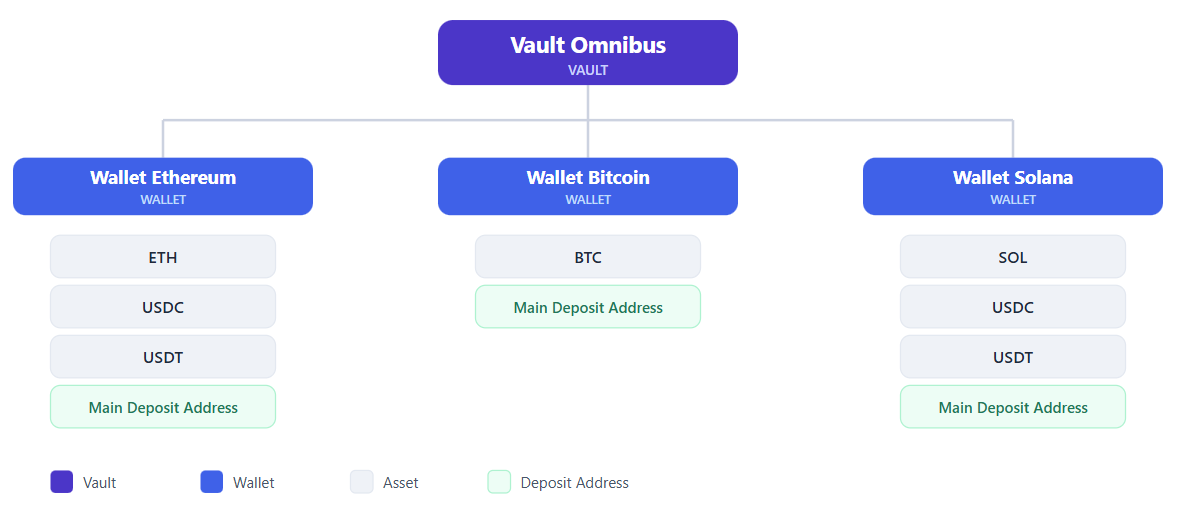
In this example:
- Omnibus is the Vault;
- each blockchain has its own Wallet;
- each Wallet gathers the assets enabled on that network;
- each Wallet has a main address for receiving funds;
- the Vault's total balance is calculated from the balances of its Wallets.
The same asset with the same SYMBOL can appear in Wallets on different networks. For example, USDC on Ethereum and USDC on Solana are shown separately, preserving the network of each position.
How to review this information on the Platform
The Vault Details page brings together information about the Vault, the Wallets that belong to it, and the on-chain transfers related to the structure.
It is divided into three main areas:
- general Vault information;
- Wallets and their assets;
- Transaction Explorer.
This page can be reached in two ways:
- Wallet Manager menu → Assets tab → select the asset → select the Wallet/Vault
- Wallet Manager menu → Wallets tab → select the Wallet/Vault
Vault information
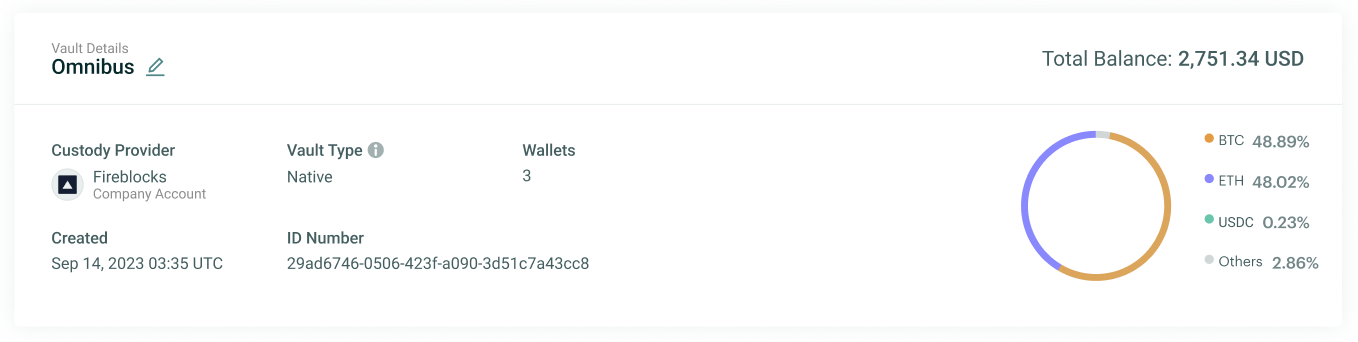
The first block on the page shows a summary of the Vault:
Vault Name — the name used to identify the Vault on the Platform.
- The edit option is available only when the provider allows renaming this structure through the integration.
- The presence of a name on the Platform doesn't necessarily mean it can be changed.
Total Balance — the consolidated USD value of the balances held in the Vault's Wallets.
- This value is an aggregate view. To understand how it breaks down, review the assets and balances shown in each Wallet.
Custody Provider — the provider and account responsible for the custody of that Vault's Wallets.
Vault Type — indicates how the Vault is represented on the provider:
- Native: an equivalent structure exists on the provider;
- Wrapper: created by the Wallet Manager to represent a Wallet from a provider that doesn't have Vaults.
Wallets — the number of Wallets that belong to the Vault.
- In a Native Vault, this number can be greater than one. In a Wrapper Vault, there is only one Wallet.
Created — the date and time the structure was created on the custody provider.
ID Number — the unique identifier assigned to the Vault by the Wallet Manager.
- This identifier belongs to Parfin's model and shouldn't necessarily be interpreted as the same identifier used by the provider.
Asset composition (chart) — the chart shows how the Vault's Total Balance is distributed across its main assets. Assets with a smaller share may be grouped under Others for easier reading.
The Vault's Wallets
The second block on the page shows all the Wallets that belong to the Vault.
Each Wallet has its own header and its own asset table.
When there are several Wallets, they are organized by the network they are associated with.
Currencies and Items
The Currencies and Items tabs switch the asset category shown across all of the Vault's Wallets.
- Currencies: shows assets with balance information, such as Balance and Available.
- Items: shows assets tracked by type and number of units, when this category is available.
The counter next to each tab indicates the number of unique assets in that category, across the Vault's Wallets.
When switching tabs, all Wallets stay visible. If a Wallet has no assets in that category, its structure is still shown, with an indication that no data is available.
Information shown for each Wallet
Each Wallet's header shows its main operational information:
Wallet Name — the name used to identify the Wallet.
- The edit action is available only when the provider and the integration allow renaming it.
Network — the blockchain the Wallet is associated with. The network determines which assets, addresses, and operations can be used in that context.
Wallet Type — the Wallet's classification on the provider, when applicable. This field may not appear for every Wallet.
Main Deposit Address — the main address used to receive assets in the Wallet.
More Options button — opens the menu with additional information and actions for that Wallet.
- The options shown act only on the selected Wallet and can vary depending on the custody provider.
Blocked Wallets
When a Wallet is blocked, a "Blocked" tag is shown.
The asset table remains available for review, but operational actions are disabled.
Actions available for a Wallet (More Options button)
The More Options menu brings together additional actions and views related to the selected Wallet.
Wallet Information
This option opens a read-only view with the Wallet's main information. It shows:
Information | What it means |
|---|---|
| Wallet Name | The Wallet's name |
| Wallet ID | The unique identifier assigned by the Wallet Manager |
| Wallet Type | The Wallet type, when applicable |
| Network | The blockchain associated with the Wallet |
| Main Deposit Address | The main address used to receive funds |
| Created at | The date and time the Wallet was created |
| Vault Name | The Vault the Wallet belongs to |
| Custody Provider | The provider responsible for custody |
Block Wallet or Unblock Wallet
- Allows requesting that the Wallet be blocked or unblocked, when this feature is supported.
- When the provider doesn't offer this action, it remains unavailable.
Deposit Addresses
- Allows reviewing the deposit addresses associated with the Wallet, including the main address and any additional addresses.
Supported Assets
- Allows reviewing the assets supported in that Wallet, based on the provider and the network.
Actions in the Wallets block
In the header of the Wallets block, the Platform may show two general actions.
New Wallet
- Allows adding a Wallet to the current Vault.
- When the action is started from the Vault Details page, that Vault is already set as the destination for the new Wallet.
- This option is available only when the Vault type and the provider allow adding other Wallets.
- In a Wrapper Vault, for example, it is not possible to add a second Wallet.
New Asset
- Allows enabling a new asset in an existing Wallet.
- The available assets depend on the network, the provider, and the features offered by the integration.
Transaction Explorer
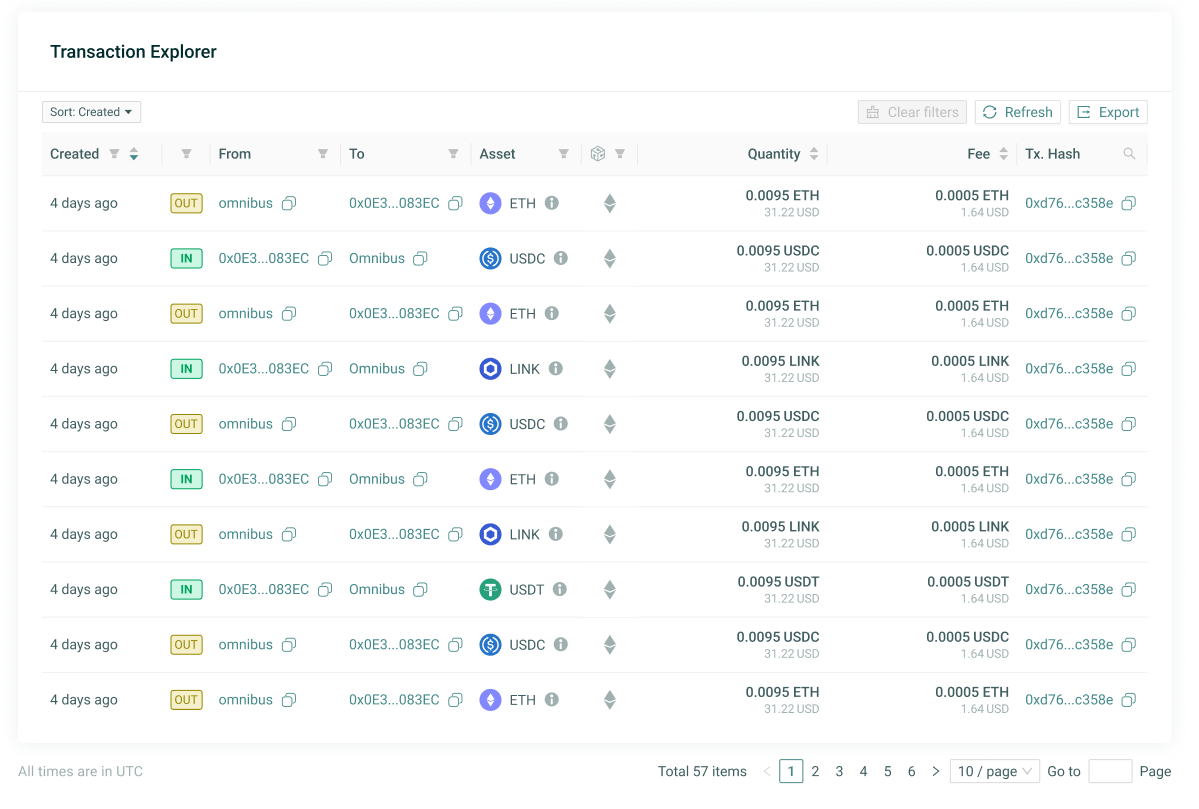
The third block on the page shows the Vault's consolidated Transaction Explorer.
It brings together the completed on-chain transfers of the Wallets that belong to that structure.
The table allows reviewing information such as:
- creation date;
- direction of the movement;
- source;
- destination;
- asset;
- network;
- amount;
- fee;
- transaction hash.
Because it shows only movements that have been completed and propagated to the blockchain, pending or rejected requests, and requests that never reached the on-chain stage, do not appear in this block.
The page allows sorting, filtering, refreshing, and exporting this information.
Why some actions may not be available
The Wallet Manager presents a common structure, but providers don't necessarily offer the same features.
Whether an action is available can depend on:
- the custody provider;
- the Vault type;
- the Wallet's network;
- the selected asset;
- the account settings on the provider;
- the permissions granted to the integration;
- the features implemented by Parfin.
For this reason, a button may appear enabled for one Wallet and unavailable for another.
In some cases, the Platform knows in advance that an action isn't supported. In others, an action can be started, but its final acceptance depends on the provider's internal rules.
Key rules and restrictions
- A Vault is associated with a single custody provider.
- A Wallet belongs to a single Vault.
- A Wallet is associated with a single network.
- A Deposit Address belongs to a single Wallet.
- A Native Vault can contain multiple Wallets, depending on the provider.
- A Wrapper Vault contains a single Wallet.
- A Wallet can have more than one Deposit Address.
- Every Wallet has a Main Deposit Address as its primary reference.
- A memo or tag is part of the deposit identifier when the network requires it.
- Balances are shown at the Wallet level.
- The Vault's balance is a consolidation of the balances of its Wallets.
- The presence of a structure or a name on the Platform doesn't mean it can be edited.
- The available actions vary according to the provider and the context of the operation.
- Some information may take some time to appear after creation or synchronization with the provider.
Learn more
To explore other concepts related to the Wallet Manager, see also: