Introduction
Governance is the set of controls that lets the instance administrator define which approval flow applies to each operation available on the Parfin platform.
The institution itself decides the level of control for each operation, according to the risk it assigns to that operation.
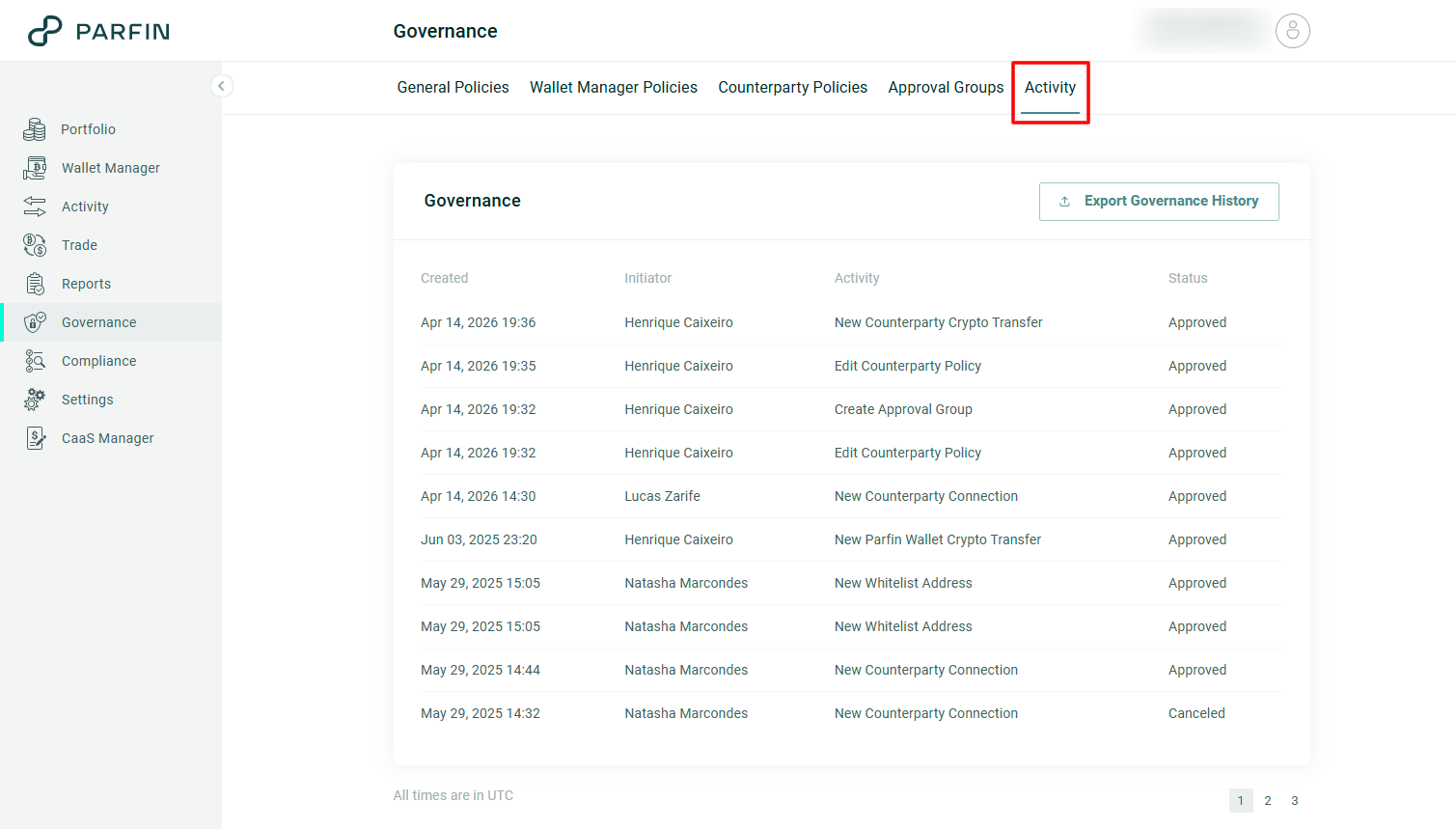
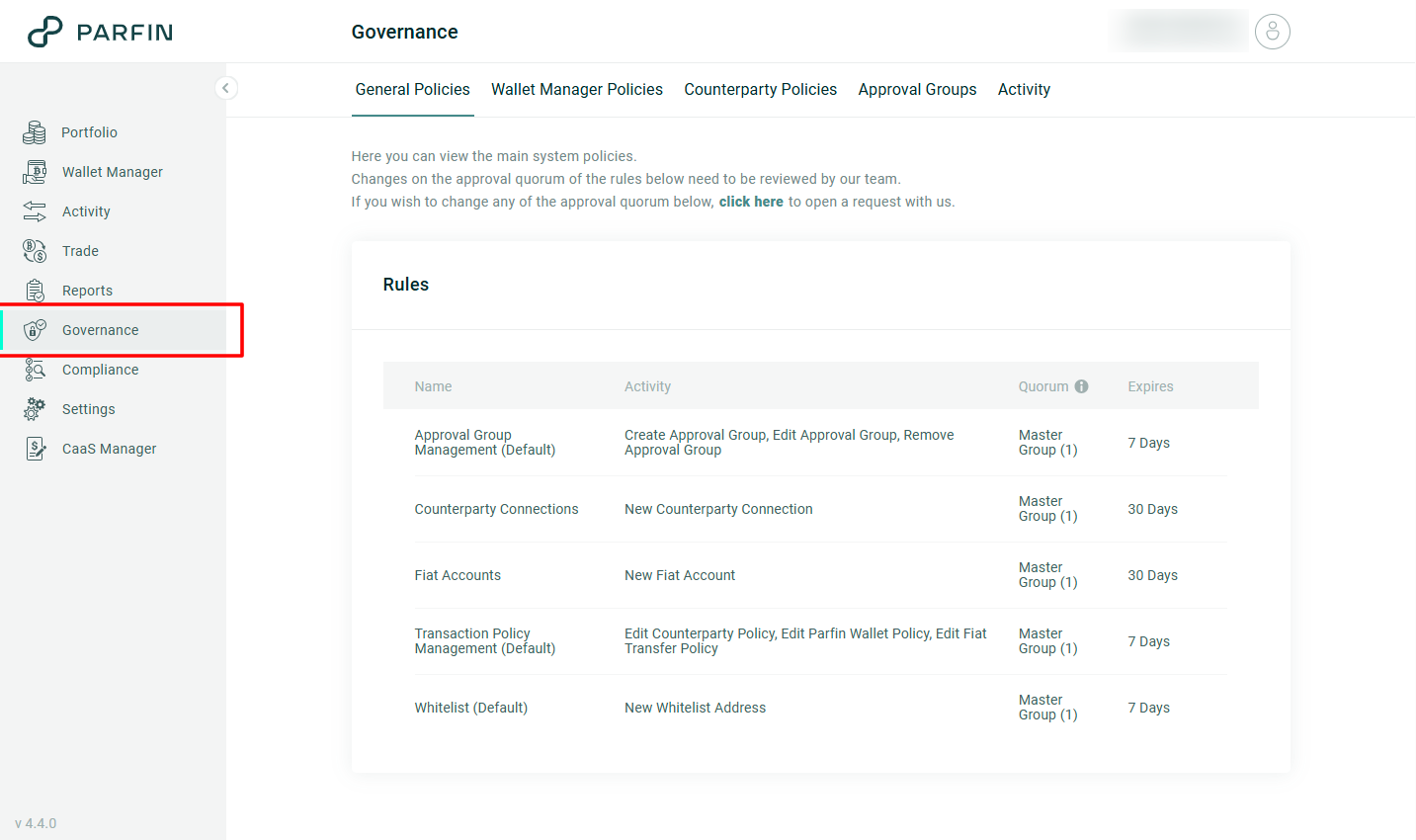
These controls are grouped under the Governance menu, organized into five tabs: General Policies, Wallet Manager Policies, Counterparty Policies, Approval Groups and Activity.
How it works
The building blocks of governance
| Component | What it is |
|---|---|
| Activity | The action performed on the Parfin platform that requires approval, for example: New Whitelist Address, New Fiat Account or Block Wallet. |
| Approval Group | A set of instance users allowed to approve. The same user can belong to more than one group. |
| Quorum | Defines the number of approvers required per group. |
| Rule | Defines the approval flow of one or more activities: which groups approve, with which quorum and within which time limit. |
| Request | Each individual approval request. It has an initiator, a creation date, an expiration deadline, a status and an approval flow. |
An approval rule governs a set of related activities. For example, the Approval Group Management rule governs the activities Create Approval Group, Edit Approval Group and Remove Approval Group, and all three follow the same group, the same quorum and the same time limit.
A rule can also combine more than one approval group, each with its own quorum, for example two approvals from treasury and one from the board for the same activity.Where the approval flow is defined
The approval flow is defined in different places depending on the type of operation.
| General Policies | Transfer policies | |
|---|---|---|
| What they are | A set of approval rules, each governing one or more activities related to configuration and registration within the instance. | A set of approval rules governing the movement of funds within the instance. |
| Examples | Adding a whitelist address, connecting a counterparty, creating a fiat account, changing approval groups | Transfers |
| How the flow is chosen | Each activity is tied to a single approval rule, so the flow is always the same. | The platform evaluates the transfer parameters (initiator, origin, destination, asset and amount) and determines which policy applies. |
| How it is set up | Through Parfin support | By the institution itself, on the Parfin platform. |
| Where they live | General Policies tab | Wallet Manager Policies and Counterparty Policies tabs |
For transfers, the rules define which groups approve and with which quorum, depending on the characteristics (parameters) of the operation.The life cycle of a request
| Status | What it means |
|---|---|
| Pending Approval | Waiting for the required quorum |
| Approved | Fully approved. The action takes effect at this point |
| Rejected | Rejected by an approver |
| Canceled | Canceled by whoever created it |
| Expired | Reached the deadline without a decision |
While a request is pending
The action only takes effect once the request is fully approved. An address awaiting approval cannot receive a withdrawal. A pending bank account does not appear as a destination. A pending counterparty cannot operate.
If the request is rejected, canceled or expires, nothing is applied and everything stays as it was.
Who can approve
The ability to approve does not come from the user profile, but from belonging to the approval group tied to that flow.
To approve a specific request, three conditions must be true at the same time:
- the user belongs to the approval group for that flow,
- that group's quorum has not been reached yet, and
- the user has not approved that request yet.
Anyone who does not meet all three conditions can still see the request, but without the approve and reject options.
Rules that apply to every flow:
- Whoever creates a request and is also an approver already counts their own approval.
- A single rejection ends the entire flow.
- When more than one group takes part in the same flow, every quorum must be met. Groups are cumulative. Take a flow with the following quorum as an example: Treasury (2) and Board (1) requires two approvals from Treasury and one from the Board.
- Anyone belonging to more than one group tied to the request approves only once. That approval counts for every group the person belongs to in that request.
- Only the author of the request can cancel it, and only while it is still pending.
- Every governance action requires two-factor authentication (2FA): submitting, approving, rejecting and canceling.
Expiration deadlines
Every request has a date and time limit, shown in the Expires field. If the flow does not reach a final status by that deadline, the request expires and nothing is applied. An expired request cannot be resubmitted, a new one must be created.
The deadline is defined per rule and can be adjusted to the institution's needs. Changes to the deadline or the quorum of an approval rule must be requested by e-mail at support@parfin.io. This applies only to the approval rules under General Policies; transfer policies are changed by the institution itself, directly on the Parfin platform.
Where to track requests
- The Activity tab, under the Governance menu, brings together every request in every status, with the creation date, who initiated it, which activity it refers to and its current status. Dates are shown in UTC, and the history can be exported.
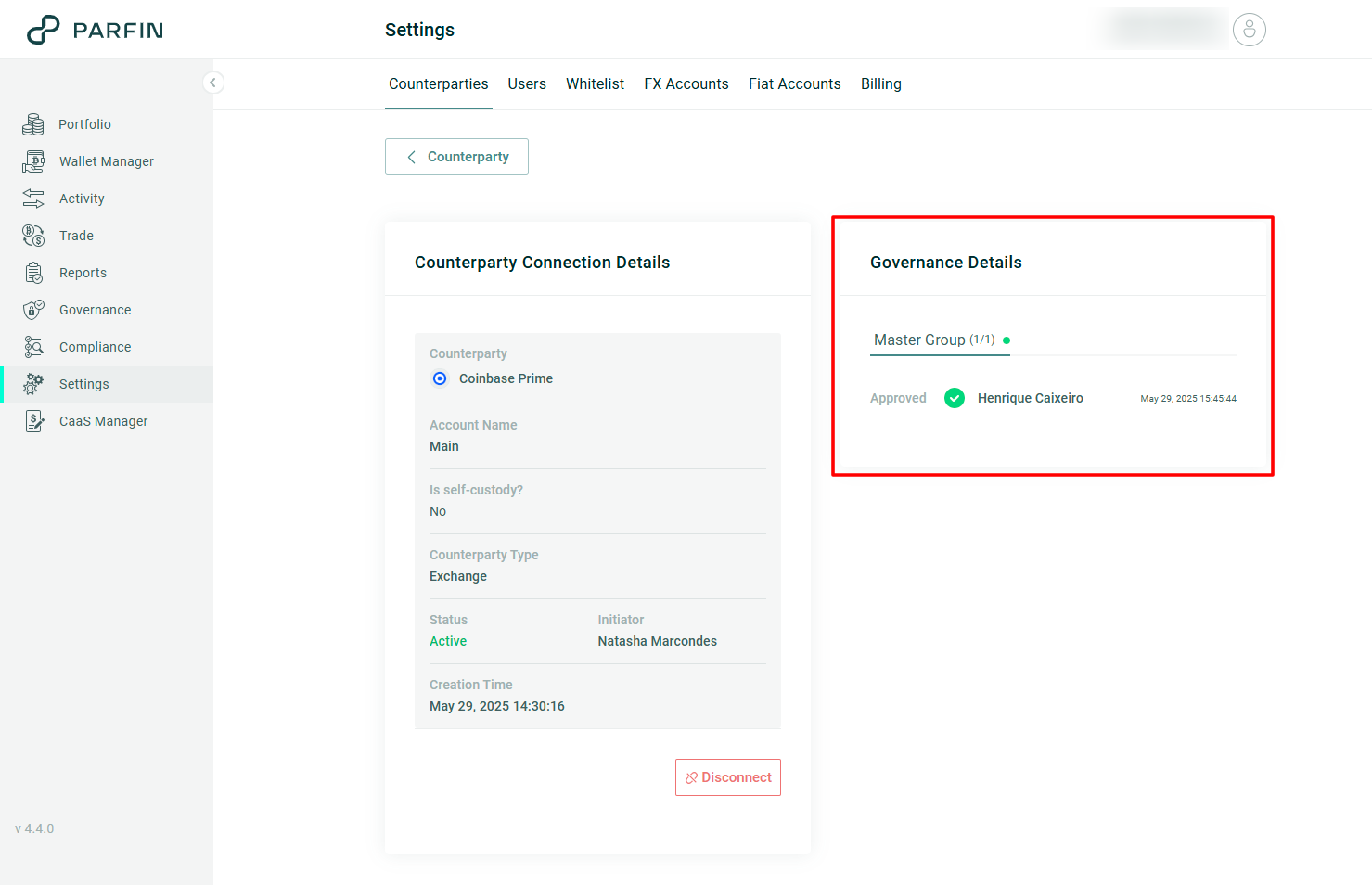
- On the record's own details page, registration operations such as whitelist addresses, fiat accounts and counterparties display the approval flow applied to each item.
- By e-mail, whenever a request changes status.